Blogger (Blogspot) themes operate on an XML-based templating engine that uniquely marries standard XHTML with proprietary Google XML namespaces (b:, data:, and expr:). Unlike imperative PHP-based systems like WordPress that generate markup dynamically per request, Blogger templates are compiled and validated as strict, declarative XML documents before Google’s rendering engine outputs them to visitors and search crawlers.
Because modern XML parsers enforce zero-tolerance well-formedness rules, even a single unclosed void tag, an unescaped ampersand in an external Google Font URL, or an unclosed CDATA script block will trigger an immediate XML parsing error. When this occurs, Blogger’s theme editor rejects the update or displays a catastrophic runtime crash: “Your template could not be parsed as it is not well-formed.” In this engineering guide, we dissect the internal architecture of Blogger themes, explain root syntax errors, and provide a systematic recovery and validation framework using the Caesar Pro Blogger Template Validator.
1. Understanding the Blogger XML Architecture
Every valid Blogger theme begins with XML version declarations and binds three core Google namespaces to control template compilation:
<?xml version="1.0" encoding="UTF-8" ?>
<html b:version='2' class='v2' expr:dir='data:blog.languageDirection'
      xmlns='http://www.w3.org/1999/xhtml'
      xmlns:b='http://www.google.com/2005/gml/b'
      xmlns:data='http://www.google.com/2005/gml/data'
      xmlns:expr='http://www.google.com/2005/gml/expr'>
Each namespace governs a distinct tier of the Blogger rendering lifecycle:
xmlns:b(Blogger Logic Elements): Controls programmatic control flow, conditional tags (<b:if>,<b:elseif>), array iteration loops (<b:loop values='data:posts' var='post'>), and modular reusable template blocks (<b:includable>and<b:include>).xmlns:data(Content & Global State Variables): Exposes server-side data models to the template. Examples includedata:blog.pageType,data:blog.canonicalUrl,data:post.title, anddata:blog.title.xmlns:expr(Dynamic XML Attribute Evaluator): Evaluates expressions within standard HTML tag attributes. Instead of writing static HTML attributes, prefixing an attribute withexpr:computes values at render time (e.g.,expr:href='data:blog.canonicalUrl').
2. The 4 Most Common Blogger XML Syntax Errors
During technical audits of custom Blogger templates, XML validation errors consistently stem from four distinct structural violations:
A. Unescaped Ampersands (&) in External Resource URLs
In standard HTML5, browsers tolerate naked ampersands inside URL parameters. In strict XML, however, the ampersand character & is strictly reserved to declare entity references (such as < or >). If an external Google Font or script includes parameter queries with naked ampersands, the XML compiler throws a fatal error:
<!-- INVALID: Naked ampersands break XML parsers -->
<link href='https://fonts.googleapis.com/css2?family=Inter:wght@400;700&display=swap' rel='stylesheet'/>
<!-- VALID: Ampersand escaped as an XML character entity -->
<link href='https://fonts.googleapis.com/css2?family=Inter:wght@400;700&display=swap' rel='stylesheet'/>B. Unclosed Void HTML Elements
HTML elements that cannot have child nodes (such as <meta>, <link>, <img>, <hr>, and <input>) do not require closing tags in HTML5. However, Blogger themes are processed as strict XHTML. Every void element MUST be self-closed with a trailing forward slash:
<!-- INVALID: Parsing Error in Blogger XML -->
<meta name="viewport" content="width=device-width, initial-scale=1">
<img src="hero.webp" alt="SEO Audit Diagram">

<!-- VALID: Strictly self-closed tags -->
<meta name="viewport" content="width=device-width, initial-scale=1" />
<img src="hero.webp" alt="SEO Audit Diagram" />
C. Corrupted Widget and Section Hierarchies
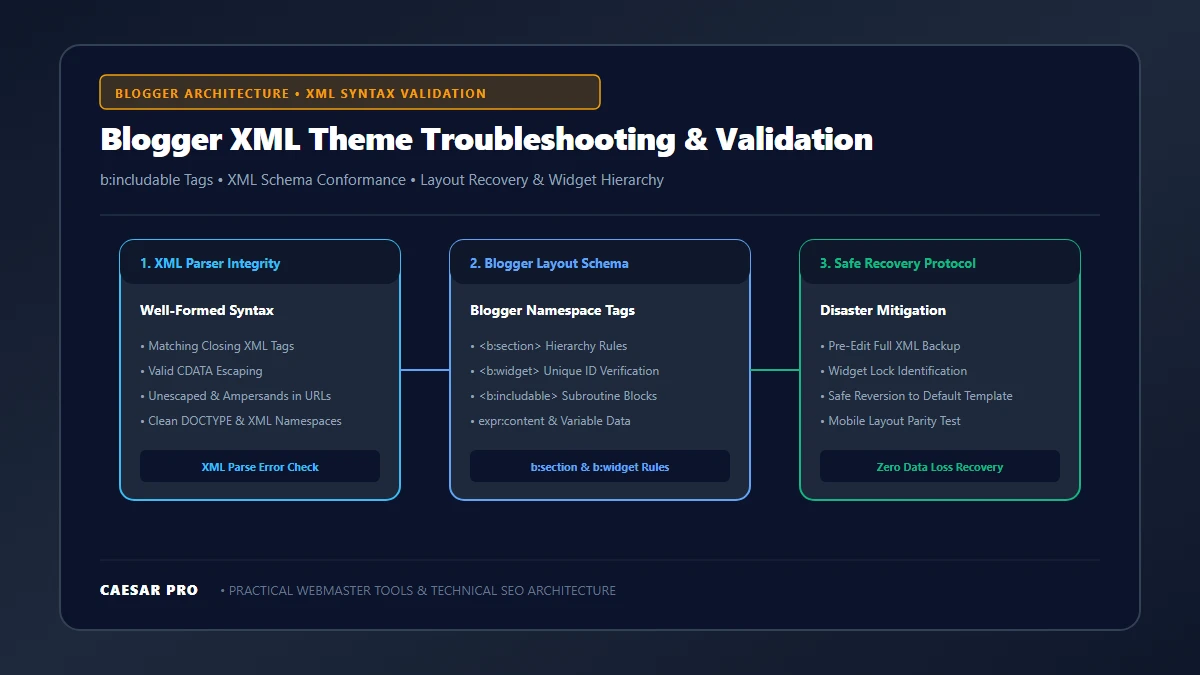
Blogger organizes page components into layout sections (<b:section>) and discrete widgets (<b:widget>). Blogger enforces strict structural constraints on these nodes:
- A
<b:section>cannot be nested inside another<b:section>. - A
<b:widget>must always reside inside a parent<b:section>. Floating widgets directly under<body>cause immediate validation failure. - Every widget must define a unique
idattribute (e.g.id='Header1',id='Blog1',id='HTML2'). Duplicate widget IDs corrupt the layout manager database. - Every widget must define at least one default
<b:includable id='main' var='top'>container.
D. Unescaped Comparison Operators inside JavaScript and CSS
When custom JavaScript or CSS containing comparison operators (like < or >) or logic operators (&&) is placed raw within Blogger templates, the parser mistakes them for opening XML tags. To prevent this, all embedded scripts and custom styles must be wrapped in a character data block (<![CDATA[ ... ]]>):
<script type='text/javascript'>
//<![CDATA[
  // Inside CDATA, comparison operators < and > are treated as literal text
  function checkViewport() {
    if (window.innerWidth < 768 && document.body.classList) {
      document.body.classList.add('mobile-layout');
    }
  }
  window.addEventListener('DOMContentLoaded', checkViewport);
//]]>
</script>
3. Safe Recovery and Step-by-Step Validation Workflow
If your Blogger theme is throwing parsing errors or failing to load, follow this standardized recovery procedure:
- Download an Emergency Raw Backup: If you can still access the dashboard, go to Theme → Customize (dropdown) → Backup and download your current theme file to your computer. Even corrupted XML files preserve custom widget logic and CSS styling.
- Analyze XML Syntax in an Isolated Environment: Rather than testing code changes on a live production blog, paste your XML template into the Blogger Template Validator. The validator analyzes element nesting, flags unclosed void tags, highlights invalid Google namespaces, and pinpoints exact line numbers.
- Preserve Core SEO Directives: When rebuilding or restoring a Blogger theme, verify that your meta tags and robots directives match best practices. Review our comprehensive tutorial on Robots.txt Best Practices for Blogger and our master guide on Fixing Blogger Low Value Content for AdSense.
- Restore to Default Theme for Staging Recovery: If the template editor is completely locked with an unrecoverable error, switch temporarily to an official Google Blogger theme (such as Contempo or Notable). Once switched, apply your corrected XML code in a single clean update.
Blogger XML Syntax Validation Reference Table
| Syntax Element | HTML5 Convention | Blogger XML Requirement | Failure Risk |
|---|---|---|---|
| Void Elements (<img>, <meta>) | Self-closing optional | Strictly self-closed (<tag />) | Fatal parser abort |
| URL Parameters | Naked ampersand (?a=1&b=2) | Escaped entity (?a=1&b=2) | Entity reference error |
| Script Operators | Raw <, >, && accepted | Wrapped in <![CDATA[ ... ]]> | Premature tag closure |
| Dynamic Attributes | Standard attributes | Prefix with expr: (e.g. expr:href) | Literal string output |
| Widget Containers | Unstructured DOM | Must reside inside <b:section> | Layout manager corruption |
Conclusion
Blogger’s XML templating framework provides a robust, fast-loading architecture when managed with strict attention to XML well-formedness standards. By properly escaping entity references, explicitly self-closing all void elements, wrapping client-side scripts in CDATA blocks, and validating updates via dedicated diagnostic tooling, webmasters can maintain flawless theme stability and eliminate search crawler rendering errors.