Search engines rely on automated crawlers to discover, analyze, and index web content. Among all web crawlers, Googlebot is the most critical for search visibility. However, website owners and webmasters frequently encounter two major challenges: malicious actors spoofing Googlebot user-agents to scrape content or probe for vulnerabilities, and legitimate Googlebot requests failing due to server-side configuration errors, rate limiting, or web application firewall (WAF) blocks.
Verifying that a crawler claiming to be Googlebot is authentic—and diagnosing why genuine Googlebot requests fail—is an essential technical SEO competency. This guide details the exact RFC-compliant verification procedures, server log analysis methods, and error remediation steps needed to maintain seamless search indexation.
1. Why User-Agent Strings Cannot Be Trusted
Every HTTP request sent across the internet includes header metadata, including the User-Agent header. While standard Googlebot requests identify themselves with recognizable user-agent tokens (such as Mozilla/5.0 (compatible; Googlebot/2.1; +http://www.google.com/bot.html)), HTTP headers are entirely client-controlled. Anyone can send arbitrary user-agent headers using standard command-line tools such as curl or custom scraping scripts:
# Example of a spoofed request: any client can send Googlebot's user-agent
curl -A "Googlebot/2.1 (+http://www.google.com/bot.html)" https://example.com/
Relying solely on user-agent detection to grant access or bypass security controls creates significant vulnerabilities. Malicious scrapers, content thieves, and automated vulnerability scanners routinely masquerade as Googlebot to bypass aggressive rate limiters. True verification requires validating the network origin of the request.
2. The Two Authoritative Methods to Verify Googlebot
Google provides two official, cryptographically sound methods to verify authentic Googlebot IP addresses: Reverse DNS (rDNS) with Forward DNS verification, and Automated IP matching against Google’s published JSON IP ranges.
Method A: Reverse DNS (rDNS) Verification (Command Line)
The standard manual verification procedure defined by Google consists of a two-way DNS handshake:
- Step 1: Reverse DNS Lookup — Run a reverse DNS lookup on the accessing IP address from your server logs. Verify that the resolved hostname ends in either
.googlebot.comor.google.com. - Step 2: Forward DNS Lookup — Run a forward DNS lookup on that resolved hostname. Verify that the resulting IP address matches the original accessing IP address exactly.
Here is an example using the standard Unix/Linux host command:
# Step 1: Query the hostname of the IP address
$ host 66.249.66.1
1.66.249.66.in-addr.arpa domain name pointer crawl-66-249-66-1.googlebot.com.

# Step 2: Confirm the hostname resolves back to the identical IP
$ host crawl-66-249-66-1.googlebot.com
crawl-66-249-66-1.googlebot.com has address 66.249.66.1
Because third parties cannot create PTR records pointing to .googlebot.com or .google.com without controlling Google’s authoritative name servers, this two-way handshake proves authenticity.
Method B: Google’s Published IP Range Lists (Automated WAF Rules)
For high-traffic production environments, performing real-time DNS lookups on every incoming request introduces prohibitive latency. Google maintains public JSON feeds documenting all active crawler IP blocks:
- Googlebot Crawlers:
https://developers.google.com/search/apis/ipranges/googlebot.json - Special-Purpose Google Crawlers (Feedfetcher, Read-Aloud):
https://developers.google.com/search/apis/ipranges/special-crawlers.json - User-Triggered Fetchers (PageSpeed Insights, Site Verification):
https://developers.google.com/search/apis/ipranges/user-triggered-fetchers.json
Enterprise firewalls (such as Cloudflare, AWS WAF, or ModSecurity) can ingest these JSON feeds on a daily cron schedule to maintain an authorized allowlist of Googlebot subnets (such as 66.249.64.0/19), ensuring zero latency overhead while blocking spoofed requests.
3. Common Server Crawling Errors and How to Diagnose Them
In Google Search Console’s Settings → Crawl Stats report, webmasters can inspect the distribution of HTTP response codes returned to Googlebot over the last 90 days. When Googlebot encounters recurring errors, crawl rate drops, new content indexation stalls, and existing rankings may decline.
HTTP 403 Forbidden
Cause: A 403 status indicates that your server understood the request but refuses to authorize access. Common culprits include overly aggressive security plugins, LiteSpeed IP throttling, or CDN bot protection blocking Googlebot’s IP addresses.
Remedy: Inspect server access logs for 403 entries matching Googlebot IPs. Whitelist Google’s ASN (Autonomous System Number AS15169) in your security suite or Cloudflare settings.
HTTP 429 Too Many Requests
Cause: The server’s rate-limiting mechanism triggered because Googlebot requested too many URLs in a short time frame.
Remedy: Googlebot automatically slows down when it encounters 429 responses, but persistent 429s harm crawl efficiency. Configure server rate limiters to exempt authenticated Googlebot IP ranges, or optimize server response times so requests complete faster without saturating worker pools.
HTTP 500, 502, 503, and 504 Server Errors
Cause: Internal PHP fatal errors (500), bad gateway timeouts between LiteSpeed/Nginx and PHP-FPM (502/504), or deliberate service unavailability (503).
Remedy: Check error_log for PHP memory limit exhaustion or database connection stockouts during crawl spikes. Implement full-page server caching (via LiteSpeed Cache or edge caching) so Googlebot receives static pre-rendered HTML without executing expensive dynamic database queries.
4. Best Practices for Protecting Crawl Budget
To ensure Googlebot allocates its crawling resources to your high-value editorial articles and tools, observe these technical rules:
- Never Block Rendering Assets: Ensure CSS, JavaScript, and font files under
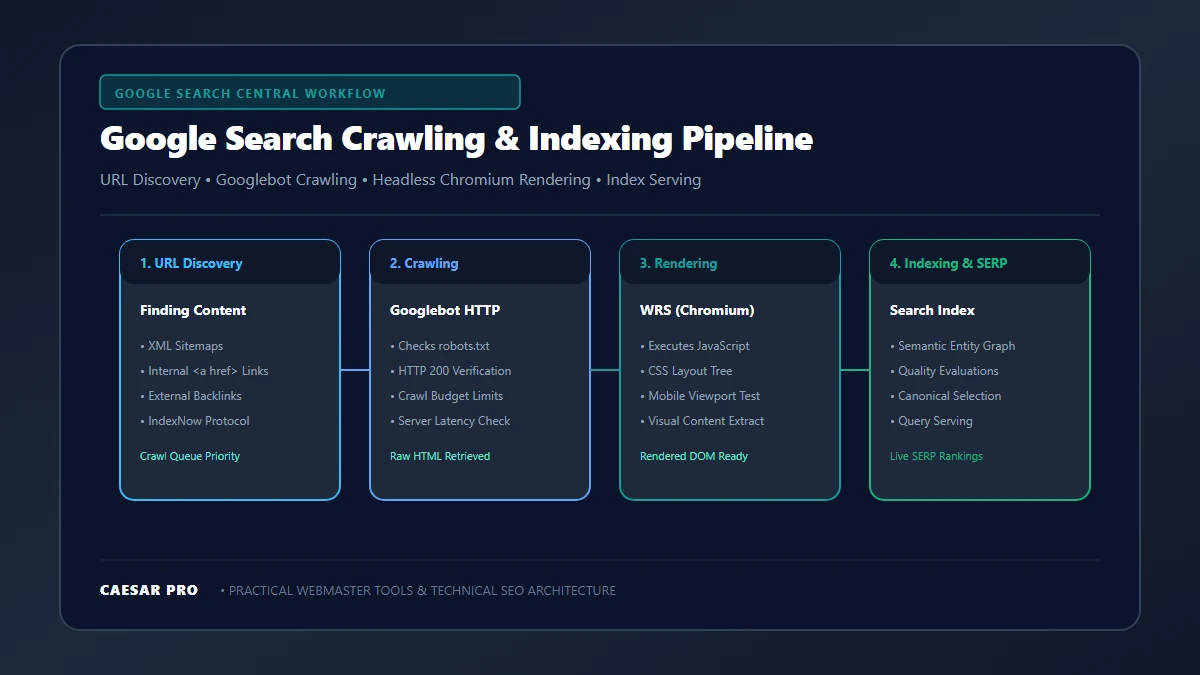
/wp-content/and/wp-includes/are not disallowed inrobots.txt(test rules with our Robots.txt Validator). Review our architectural breakdown on How Google Crawling and Indexing Work. Googlebot requires these assets to evaluate mobile layout, font sizes, and layout shifts. - Return Clean 404s or 410s for Deleted URLs: Avoid soft-404 errors (pages that return status 200 but display “Not Found” text). Soft-404s waste crawl budget and create coverage warnings.
- Provide Accurate Last-Modified Headers: Configure server page caching to return HTTP 304 Not Modified when content has not changed since Googlebot’s previous visit. This allows Googlebot to skip downloading unmodified bytes.
Conclusion
Verifying Googlebot is a fundamental requirement for maintaining both search visibility and infrastructure security. By implementing two-way DNS validation, utilizing published IP range allowlists in your firewall, and regularly monitoring Search Console’s Crawl Stats report, you ensure your publication remains fully accessible to legitimate search crawlers while repelling malicious bots.